

A project review is on the calendar. The characterization team has one workbook per instrument run. Formulation scientists kept their own templates. Process engineers added a few columns that made sense locally but not across the group. Now someone has to consolidate multiple Excel files into one usable dataset before the meeting, and the work usually lands on the same person.
In R&D, that cleanup job looks small until it isn't. A file-based process can hold together for ad hoc analysis, but it breaks down when experimental data needs to be compared across batches, traced back to source conditions, and reused later for modeling. The immediate problem is Excel consolidation. The larger problem is that the lab has no reliable data backbone.
Table of Contents
- Why Power Query fits repeatable lab workflows
- How to set up a folder based consolidation flow
- What works well and what breaks first
- What a centralized data backbone changes
- Where governance stops being optional
- One practical path forward
The Challenge of Fragmented Experimental Data
A materials lab rarely starts with bad intent. It starts with speed. One scientist builds a workbook for tensile data, another tracks formulation changes in a separate file, and a third exports instrument output into whatever tab structure the software produces. Each file is reasonable on its own. Together, they create a consolidation problem that keeps recurring.
The trouble isn't just that there are many files. It's that each file carries small local assumptions. One workbook calls a field "Sample ID." Another uses "Specimen." A third splits the same concept into two columns because that helped during one project. By the time a lab manager asks for a portfolio view, someone has to decode those choices by hand.
Why experimental spreadsheets drift apart
Experimental data drifts because people optimize for the task in front of them. They don't optimize for future merge logic.
A typical pattern looks like this:
- Different templates emerge: Teams copy last quarter's sheet, then add columns for new conditions or instrument outputs.
- Labels stop matching: Units, sample names, and status fields get entered in slightly different ways.
- Context lives outside the data: Scientists remember why a column changed, but the workbook doesn't.
- Review pressure compresses quality checks: Near a meeting, speed beats structure.
Practical rule: If two scientists can enter the same fact in two different ways, consolidation will become a data integrity problem, not just a spreadsheet problem.
This is why I treat file consolidation in R&D as a workflow design issue. The spreadsheet is only the surface layer. Under it, you have schema drift, ambiguous ownership, and weak traceability. If your team is already thinking about more formal definitions for key fields, this guide to trusted SaaS metrics is useful because the idea of data contracts maps well to lab data too. You need shared rules for what a field means before you can trust any rollup built from it.
Why this slows more than reporting
The visible cost is manual cleanup before a milestone review. The hidden cost is that nobody fully trusts the merged file afterward.
That matters in R&D because downstream work depends on comparability. If formulation data, test conditions, and outcomes don't line up cleanly, a scientist can't tell whether a signal is real or caused by inconsistent data entry. Model building becomes risky. Even simple trend analysis becomes an argument about the spreadsheet rather than the experiment.
A decentralized Excel habit also changes how teams behave. Scientists stop asking broader cross-project questions because pulling the data together is painful. Leaders delay standardization because each cleanup still feels "possible." The lab stays stuck in reactive data wrangling.
The Scalable Excel Method with Power Query
If you're staying inside Excel, Power Query is the method I trust most for repeatable consolidation. Microsoft documents Get Data > From Folder as a core approach for combining multiple sheets or files, and it is the preferred path when many files must be appended repeatedly because it can turn each source into a table and combine them through a folder-based import. Microsoft also notes that this works especially well when files share the same columns, because the query can standardize and merge them into one table without VBA or repeated manual steps, as shown in Microsoft's guidance on combining data from multiple sheets.
Why Power Query fits repeatable lab workflows
Power Query sits in the useful middle ground. It isn't as brittle as manual copy-paste, and it doesn't force every scientist to become a programmer. For many lab teams, that's the right level of automation.
Its real strength is repeatability. Instead of redoing the same import and cleanup steps every review cycle, you define them once in the query. Then you refresh the output when new files arrive in the folder. For experimental data, that is often good enough to remove the weekly scramble.
How to set up a folder based consolidation flow
The cleanest setup is a controlled folder that contains only source workbooks meant for one consolidation process. Keep unrelated files out. That sounds basic, but it matters.
Use this flow:
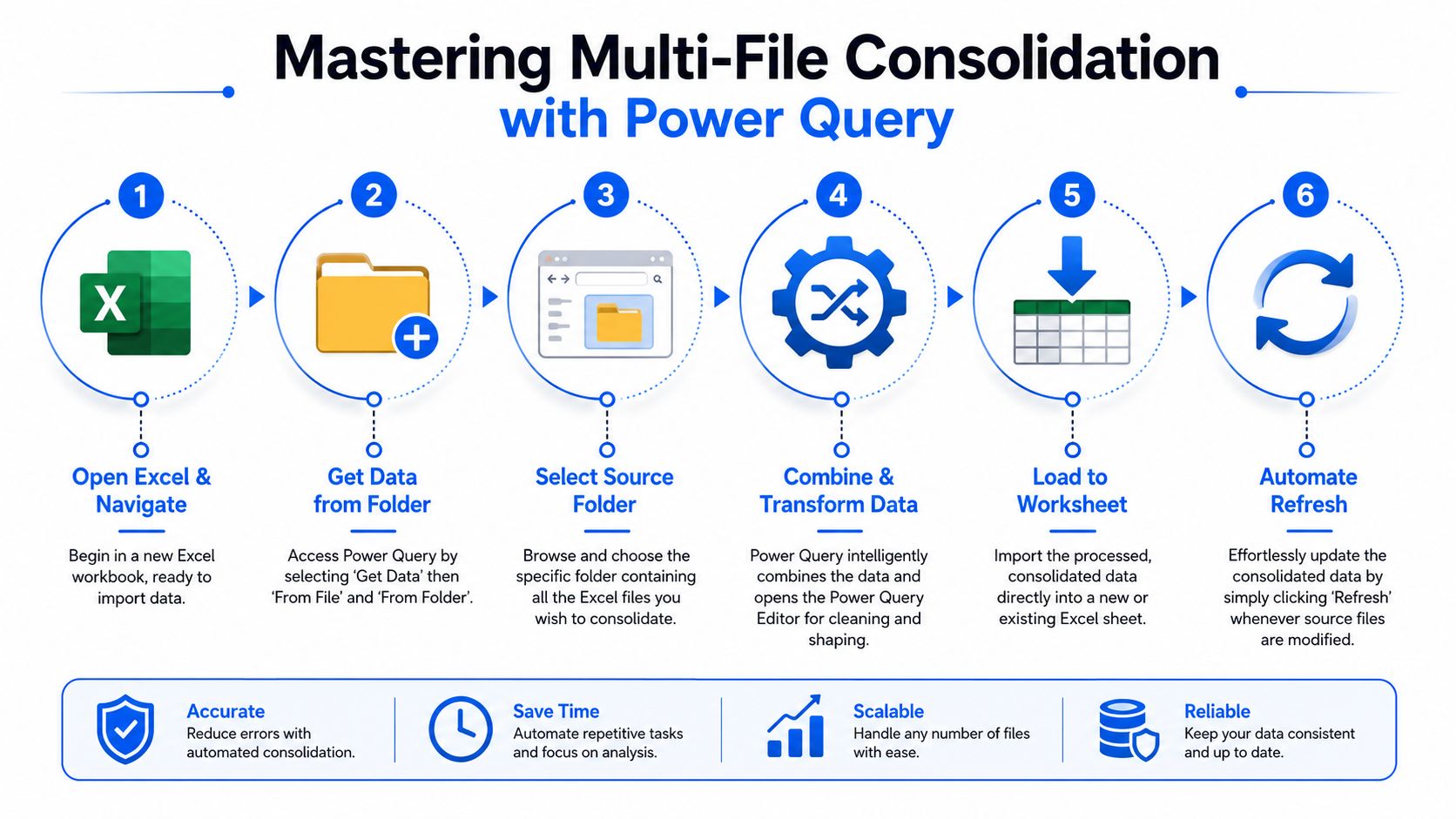
- Standardize the source shape first: In each workbook, convert the source range into a table with Ctrl+T. This gives Power Query a clearer structure to read.
- Open a new workbook for the master dataset: Keep the consolidation logic separate from the raw files.
- Go to Get Data and choose From Folder: Point Excel to the directory where the experimental files live.
- Choose Combine Files or append the tables: This is the core action when files share the same columns.
- Clean inside Power Query: Rename columns to a common standard, trim whitespace, remove obvious junk rows, and align data types.
- Load the result to a worksheet or data model: Then refresh when new files are added.
Power Query also supports combining data through workbook objects such as Excel.CurrentWorkbook(), which is useful when the sources already live in a single workbook structure rather than a file folder approach. In practice, I use folder import more often for lab work because teams tend to store one workbook per run, per batch, or per researcher.
Keep the folder narrow in purpose. One folder for one consolidation logic is far safer than one shared drive directory full of mixed exports.
For scalable, repeatable consolidation across many files, the folder method is also the more reliable operational pattern. A practical walkthrough of the approach shows connecting From Folder, then using Combine Files or Append so new workbooks dropped into the folder are appended automatically. That approach is especially useful when files share the same columns, but it depends on consistent schema and folder hygiene, as demonstrated in this Power Query folder consolidation walkthrough.
What works well and what breaks first
Power Query is strong when your issue is operational inconsistency, not conceptual inconsistency. It handles recurring file arrival well. It handles light cleanup well. It gives non-programmers a repeatable path.
It struggles when the source files don't just differ in formatting, but differ in meaning. If one team records a calculated viscosity and another records raw instrument traces, no amount of append logic will fix that. Power Query can align columns. It can't resolve unclear business rules for you.
Microsoft's legacy Data > Consolidate feature still exists, and it can summarize multiple ranges using functions such as Sum, Average, or Count. Microsoft also says to place the result in the upper-left cell of the destination area, leave room for the output to expand, and use matching labels in the top row or left column for accurate consolidation. That tool still has a place for simple numeric rollups across matching ranges. In R&D, though, it is usually too limited for messy multi-file experimental datasets because row-wise appending is often required, not just aggregate summaries.
Scripting for Custom Logic with VBA and Python
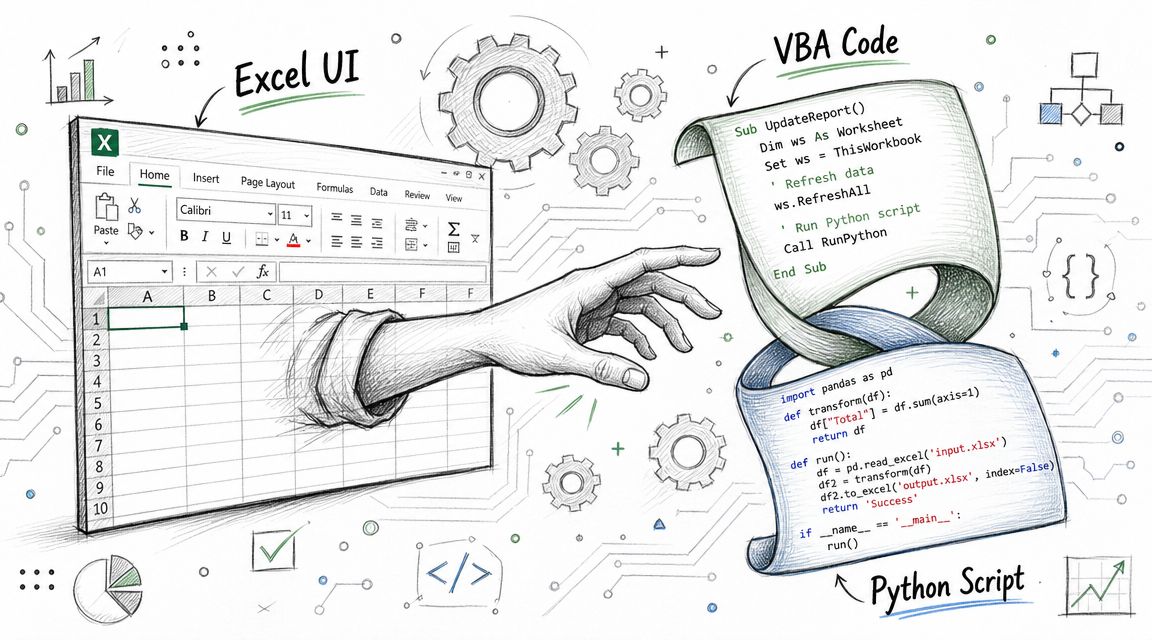
There comes a point where the Excel interface stops being enough. Not because Excel is bad, but because the consolidation rules become too specific. You might need to inspect filenames for metadata, map multiple legacy templates into one schema, or reject records that fail validation. That's where scripting earns its keep.
When VBA still earns its place
VBA remains useful when the team is committed to Excel and the workflow has to stay embedded in the workbook. In some labs, that constraint is real. Scientists know Excel well, IT policies are conservative, and the process needs to run from a button inside the file.
VBA is a reasonable choice when:
- Workbook interaction matters: You need to open sheets, move ranges, trigger workbook-specific formatting, or populate a fixed report template.
- The logic is custom but local: The process depends on a small set of known files and stable locations.
- Users won't leave Excel: The macro has to feel like part of the spreadsheet, not a separate toolchain.
The downside is maintainability. VBA often starts simple, then accumulates exceptions. A new file naming convention appears. A sheet is renamed. A source layout shifts by a column. The macro still runs, but now only one person trusts it, and that person becomes the support desk for the lab.
Use VBA when the workbook is the product. Don't use VBA when the workbook is only a temporary container for a growing data pipeline.
When Python becomes the better tool
Python, usually with pandas, is the stronger option when the data process is becoming a real pipeline rather than an Excel task. It is better suited to validation, schema mapping, logging, and integration with storage or downstream analytics.
In R&D settings, Python becomes attractive when you need to:
- Validate before merge: Reject files that are missing required fields or contain invalid values.
- Map several templates into one schema: Older project files rarely match newer ones exactly.
- Attach provenance fields: Add source filename, sheet name, load timestamp, or project code during import.
- Feed another system: Export to a database, analytics notebook, or enterprise platform after consolidation.
A conceptual pattern looks like this:
from pathlib import Pathimport pandas as pdfiles = Path("lab_exports").glob("*.xlsx")frames = []for file in files:df = pd.read_excel(file)df["source_file"] = file.name# standardize column names# validate required fields# map legacy headers into target schemaframes.append(df)master = pd.concat(frames, ignore_index=True)That snippet is intentionally simple, but it shows the core advantage. With Python, you can separate ingestion, validation, transformation, and export into clear steps. That makes the process easier to test and easier to explain to someone else.
A short walkthrough can help if your team wants to see how this style of automation works in practice.
A practical decision point
The question isn't whether code is more powerful. It is. The question is whether your team can support it responsibly.
VBA is closer to the user and farther from good software practices. Python is farther from the casual Excel user but much closer to a maintainable data workflow. In an R&D organization, I usually recommend Python when the consolidation logic affects data quality decisions, cross-team reporting, or model inputs. If the process influences scientific conclusions, it deserves version control, tests, and explicit validation rules.
Choosing Your Consolidation Method
A lab doesn't need the most advanced option. It needs the option that matches the risk of the data and the frequency of the task. If the team consolidates multiple Excel files once for a one-off review, manual work may be acceptable. If the same process repeats every week and supports project decisions, manual work becomes hard to justify.
Comparison of Excel Consolidation Methods
| Method | Best For | Scalability | Technical Skill | Repeatability |
|---|---|---|---|---|
| Manual copy-paste | One-off merges with a small number of familiar files | Low | Low | Low |
| Power Query | Recurring append workflows with similar file structures | Medium | Medium | High |
| VBA | Excel-bound automation with workbook-specific logic | Medium | Medium to high | Medium |
| Python | Complex validation, schema mapping, and pipeline integration | High | High | High |
That table looks simple, but the trade-offs are sharp. Manual work feels fast until a file is missed or a column lands in the wrong place. Power Query is the strongest built-in Excel path when the source structure is reasonably consistent. VBA is helpful when the automation must live inside Excel. Python is what you choose when consolidation has become part of a governed data process.
How I would choose in a lab setting
I use three filters.
- How often does the process repeat: If it's recurring, build a repeatable method immediately.
- How variable are the source files: If files differ only slightly, Power Query can usually cope. If they differ semantically, move to code or redesign the process.
- What happens if the merged data is wrong: If mistakes only waste time, lightweight methods are acceptable. If mistakes affect technical decisions, use a controlled workflow with validation.
A lab manager should also ask who will maintain the solution. A clever consolidation routine that only one person understands isn't a stable operating model. In practice, the best method is often the one that another competent team member can inspect and run without folklore.
Beyond Spreadsheets Enterprise Best Practices for R&D Data
Most discussions about how to consolidate multiple Excel files stop at tooling. In enterprise R&D, that's not enough. The recurring need to merge spreadsheets is usually evidence of a structural issue. The organization stores critical experimental knowledge in disconnected files instead of a controlled system.
What a centralized data backbone changes
A centralized data backbone changes the operating model from file collection to data capture. Scientists still work in familiar tools where needed, but results land in a system designed to preserve context, ownership, and structure.
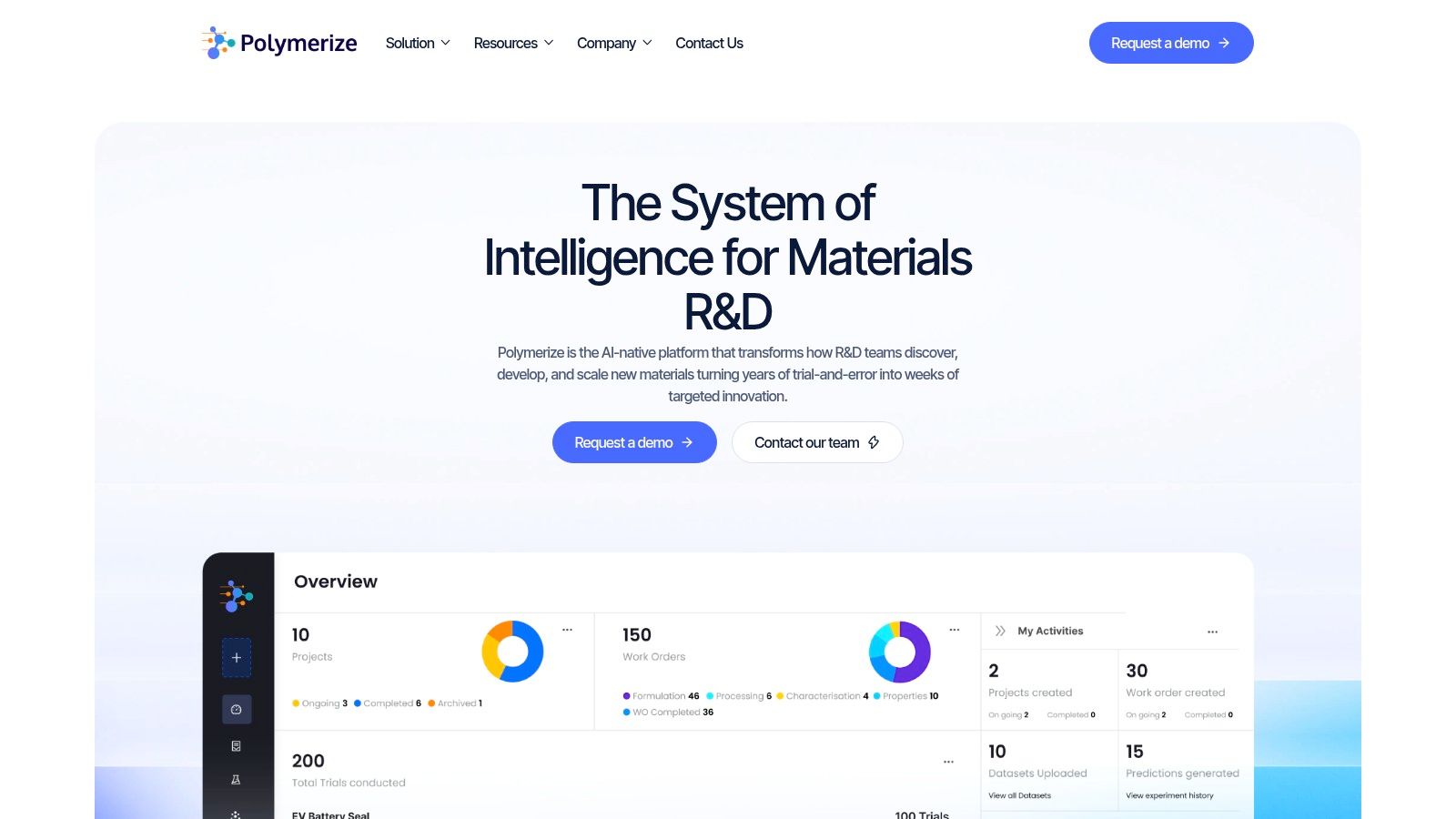
When that happens, several chronic Excel problems become easier to manage:
- Schema consistency improves: Teams work against defined fields instead of endlessly copied templates.
- Traceability becomes normal: A result can be linked back to source conditions and experiment context.
- Collaboration stops depending on file naming discipline: People work from shared records rather than emailed attachments.
- AI readiness becomes realistic: Data can be reused because it is structured on entry, not reconstructed later.
This is the point where a platform becomes relevant. For example, Polymerize is positioned as a centralized system for fragmented materials R&D data across spreadsheets, ELNs, and other silos, which is the kind of architecture organizations adopt when spreadsheet consolidation has turned into an operational bottleneck.
Where governance stops being optional
As soon as R&D data supports regulatory review, IP protection, or cross-site collaboration, governance stops being a nice-to-have. It becomes part of daily lab operations.
That doesn't mean every scientist needs to think in governance language. It means the system should make good practice the default. Versioned records, controlled access, clear provenance, and durable document handling all reduce the number of assumptions hidden in spreadsheets. Teams that are working through broader compliance questions may also find this perspective on audit readiness with DMS useful, because document discipline and experimental data discipline usually rise or fall together.
A spreadsheet can store a result. It doesn't reliably preserve the full story around that result unless the team adds process around it.
One practical path forward
I don't advise most labs to rip Excel out overnight. That's rarely practical, and it usually creates resistance for the wrong reason. A better path is staged.
Start by controlling the places where spreadsheets enter the process. Standardize templates where you can. Use repeatable import logic where consolidation still has to happen. Then move high-value datasets into a centralized environment where metadata, permissions, and lineage are part of the system rather than an afterthought.
That progression does two things. It reduces today's manual cleanup, and it lays the groundwork for future analytics and ML work without pretending the current file sprawl is sustainable. In an enterprise R&D setting, tactical Excel fixes are useful. They just shouldn't become the long-term data strategy.
From Manual Cleanup to Targeted Innovation
The need to consolidate multiple Excel files is usually a symptom of growth. More experiments, more teams, more instruments, more urgency. What looked manageable as a handful of workbooks turns into a recurring data engineering problem hiding inside lab operations.
The good news is that there is a usable progression. For straightforward recurring merges inside Excel, Power Query gives the first real step toward repeatability. When the logic becomes custom and quality checks matter, scripting with VBA or Python gives you more control. When the organization keeps revisiting the same consolidation pain, it is time to move beyond file-centric processes.
The key decision isn't about software preference. It's about data integrity. If the merged dataset influences scientific interpretation, formulation decisions, or portfolio review, the method has to be reliable enough for that responsibility.
Well-managed experimental data changes what scientists spend time on. They stop reformatting tabs and checking whether a column was missed. They start comparing outcomes, testing hypotheses, and designing the next experiment with confidence. That is the payoff. Better consolidation isn't just cleaner reporting. It is one of the practical steps that moves R&D from manual cleanup to targeted innovation.
If your team is still stitching together experimental workbooks by hand, Polymerize is worth evaluating as a way to unify fragmented R&D data into a centralized system built for materials workflows, traceability, and AI-ready analysis.
Put your R&D data to work
See how materials teams use Polymerize to plan fewer experiments and reach target properties faster.