
If you're trying to onboard a fresh wave of scientists into an ELN, a LIMS, a model workspace, and three different storage systems at once, the mess usually shows up in the same places. Someone can't get into the assay notebook, a contractor still sees last quarter's formulation folder, and a project lead isn't sure who can approve schema changes. In materials R&D, user account administration is what keeps that sprawl from turning into IP leakage, audit friction, and endless manual cleanup.
One reason this gets missed is that R&D teams often treat access as an IT ticket instead of a design problem. That works until a lab moves fast, people rotate between programs, and external partners need narrow access to shared data. The better model is closer to identity governance than basic account setup, because the account itself is tied to scientific workflow, experimental history, and the protection of proprietary methods.
Table of Contents
- Joiners need narrow, role-based access from day one
- Movers are where R&D teams usually leak access
- Leavers need immediate, testable revocation
Why Account Administration Is the Backbone of Modern R&D Platforms
The R&D IT lead gets the same request every week. Add a dozen scientists, a few process engineers, one external synthesis partner, and a couple of QA reviewers into the new platform, but make sure each group sees only what it needs. On paper, that sounds like a provisioning task. In practice, it means coordinating ELN access, LIMS permissions, file shares, notebook visibility, and the rules for who can change master data without breaking the study record.
That's why account administration sits underneath everything else. Cloud admin consoles already show the shift clearly, because Microsoft 365 admin usage reports track activity across 7, 30, 90, or 180 days and help administrators spot who is active, who is underused, and who may no longer need a license, while Google Workspace account reports classify users as active, blocked, or suspended and show whether they're enrolled in two-step verification. Those controls are not just reporting features, they reflect a move from static account setup to continuous identity governance and license control in a time window. Microsoft 365 admin usage reporting
In materials R&D, that shift matters more because the account record is tied to intellectual property. A formulation scientist might only need read access to a historical study, while a platform admin can alter schemas, assign project permissions, or expose data that later feeds an AI model. A weak account model turns every one of those actions into a potential failure point.
What breaks first when governance is loose
A lab team can survive a clumsy interface. It can't survive unknown access paths. Orphaned accounts linger after contractors leave, movers keep access to old programs, and audit requests turn into spreadsheet archaeology. The result is not just inconvenience, it's a direct threat to confidentiality, traceability, and scale.
Practical rule: if you can't answer who can read, who can edit, and who can administer a scientific system without opening three different consoles, your identity layer is already too fragmented.
A centralized R&D platform like Polymerize is useful in this context because it treats unified data, secure access, and AI readiness as linked problems instead of separate ones. That's the right direction for materials teams, since the same identity backbone that protects a proprietary formulation also determines whether the data behind it can be used consistently for analysis and model building.
Defining User Account Administration and Its Core Building Blocks
In a materials R&D platform, a laboratory badge solves four separate problems at once. The photo identifies the person, the colored strip shows the role, the doors it opens define entitlement, and the validity at a specific doorway reflects the current session.
At its simplest, user account administration is the lifecycle management of digital identities, access rights, and login sessions. It answers four separate questions. Who is this person, what kind of user are they, what can they touch, and how are they proving it right now.
Identity and role are not the same thing
Identity is the record that says the account belongs to a real person, a contractor, or a service account. Role is the organizational label that says what type of work they're supposed to do. Mixing those together causes trouble fast, because a title can change while the identity stays the same. In R&D, that matters when a scientist moves from formulation work to analytical support and should not keep broad access just because the old role was easy to leave in place.
Entitlement and session are separate control points
Entitlement is the specific permission set. Can the account view a study, edit a master record, approve a workflow, or change a schema. Session is the current authenticated context, which is why MFA and re-authentication matter for dangerous actions. The account can exist, the role can look right, and the entitlement can be technically assigned, but if the session is stale or too broad, the access model is still weak.
For account maintenance workflows in a SaaS-style environment, even a basic help article like a reminder that account administration is always about the full lifecycle is useful. Materials teams need the same discipline, but with a much sharper eye on formulas, experimental provenance, and privileged changes. That is why manage your Throughwire account fits here as a practical reference point, even if the governance problem in a lab system is harder than routine signup or password resets.
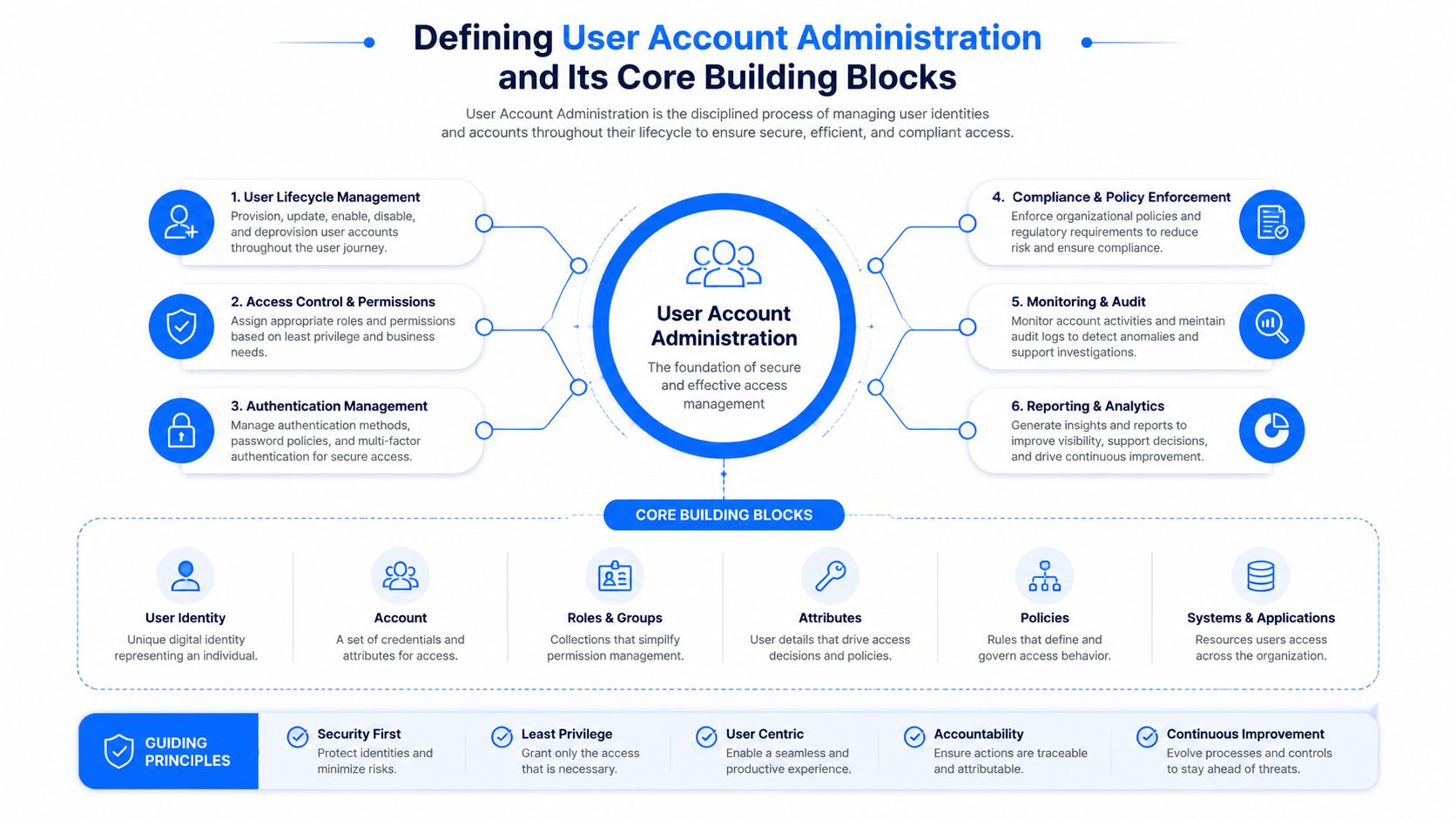
The point of separating these building blocks is operational clarity. If one person can edit an ELN template, another can only read it, and a third can administer the environment, those are three different decisions. Treating them as one checkbox is how platforms end up over-permissioned and hard to audit. In materials R&D, that also blurs the line between scientific work and platform control, which can expose IP, weaken traceability, and make later reviews harder than they need to be.
Standard Access Versus Privileged Access
The most important split in any R&D identity model is between standard and privileged access. Standard users need to run their work, read data they're allowed to see, and complete routine tasks. Privileged users can alter the platform itself, which in a materials context can mean admin consoles, ELN schema changes, LIMS master-data edits, workflow triggers, or model retraining controls.
That second group needs a different operating model because the risk is different. MITRE recommends enforcing least privilege, requiring MFA for administrative users, and restricting privileged interactive logons to specific secure systems or management consoles. It also gives practical thresholds that are easy to operationalize. Disable inactive accounts after about 30 days, lock accounts after five failed login attempts, and keep lockouts for at least 15 minutes to reduce brute-force and orphan-account risk. MITRE least privilege guidance
What counts as privileged in an R&D stack
An ELN admin who can modify notebook templates is privileged. A LIMS user who can change master data or inheritance rules is privileged. A platform engineer who can adjust identity mappings, sync rules, or model promotion paths is privileged. These are not just “power users.” They're the people whose actions can reshape how the lab records work, which means their accounts need stronger controls and tighter review.
A common mistake is to compensate for slow approvals by creating more standing admin accounts. That feels faster, but it usually spreads risk wider. A smaller population of privileged accounts, tightly reviewed and separated from everyday work, is easier to monitor and much easier to justify to auditors.
Practical rule: if a task can be completed with delegated workflow approval or temporary elevation, don't create a permanent admin identity for it.
Why the thresholds matter
The MITRE thresholds are useful because they move policy out of opinion territory. Thirty days is a concrete point for cleaning up unused access. Five failed logins is a sensible trigger for lockout because it slows guessing without permanently trapping normal users. Fifteen minutes is long enough to blunt brute-force attempts without making the help desk the bottleneck for every typo.
In R&D, that discipline also protects experiments. A privileged user who can edit the wrong control table or revive an old integration account can create downstream data corruption that looks like scientific noise instead of an access issue. Separation is not bureaucracy. It's containment.
Provisioning and Deprovisioning Across the Joiner Mover Leaver Lifecycle
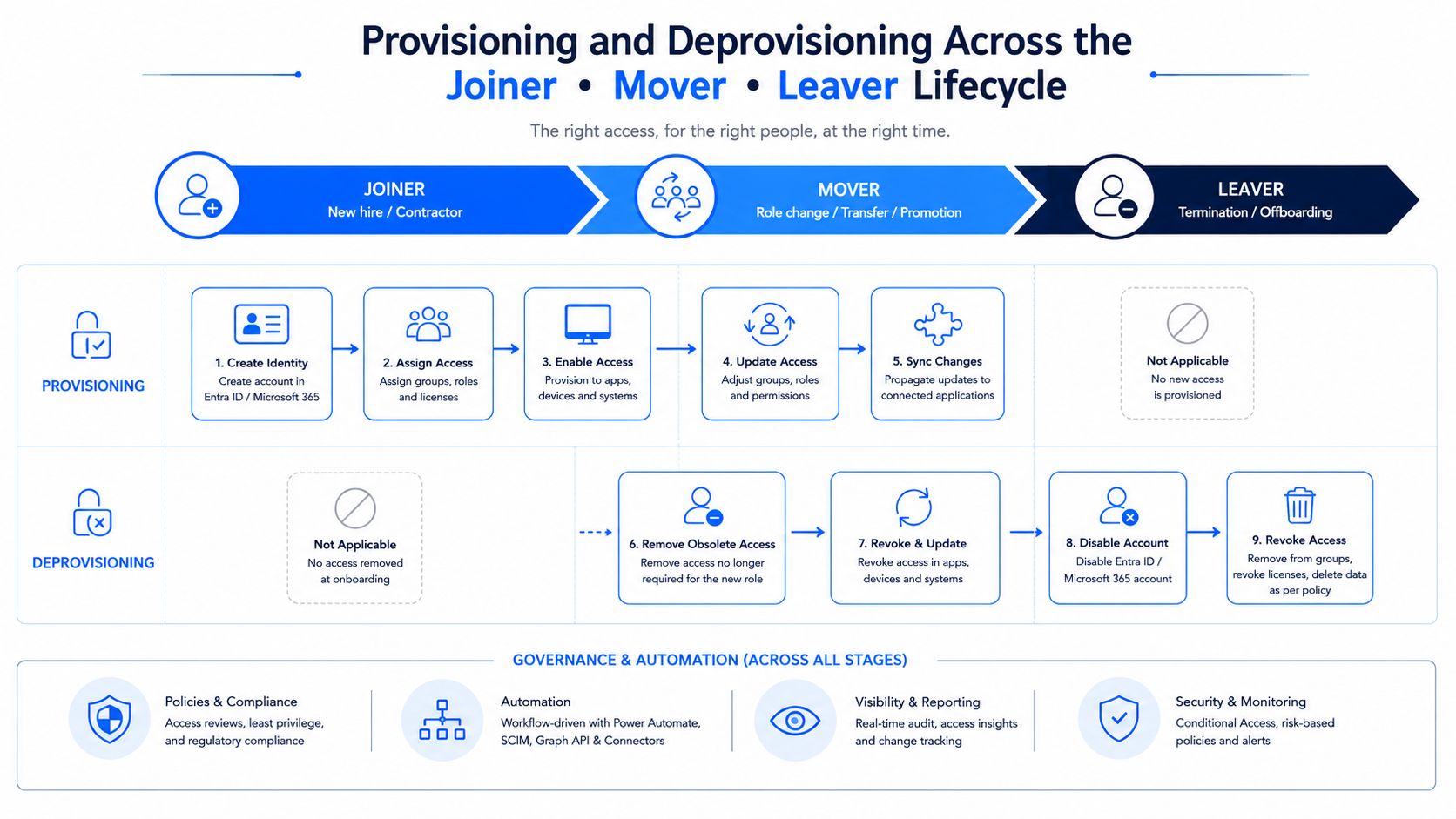
Treat account administration as a lifecycle control and most of the mess starts to make sense. The joiner, mover, leaver model works because access changes when work changes, not just when people arrive or depart. In R&D, those changes are often triggered by HR onboarding, project reassignment, ELN group membership updates, or LIMS role rotations.
The joiner phase should start from a minimum access profile, then add only the permissions needed for the current assignment. That pattern lines up with Salesforce's guidance to begin from least access and layer permission sets with assignment expiration so extra rights don't become permanent by accident. Google's recommendation to store passwords as strong one-way hashes such as Argon2id or scrypt reinforces the same point from the credential side, because lifecycle discipline is only as strong as the account store behind it. Salesforce admin best practices for user management
Joiners need narrow, role-based access from day one
When a new scientist joins a program, the right trigger is not a manual email chain. It's the approved onboarding event that creates the baseline account, maps them to the correct lab, and grants the smallest usable set of ELN, LIMS, and document permissions. That keeps new accounts from starting life overexposed because nobody wanted to slow the launch.
Movers are where R&D teams usually leak access
A mover is the person who changes programs, sites, or responsibilities. In materials work, that is where lingering access becomes dangerous. The chemist who moved off an adhesive program may still be able to open formulation records months later, even though they now work on coatings. That stale access is especially risky because old projects often contain the most sensitive IP.
Leavers need immediate, testable revocation
Offboarding should remove the account or strip access in a way you can verify. A common failure mode is not always malicious. It's a leaving employee who still has read access to proprietary data, shared drives, or old notebook histories because one system was missed. Automation reduces that risk by making the HR event the source of truth and the downstream systems the consumers.
A useful implementation pattern is simple.
- Start with HR status: create or disable accounts from the personnel event, not from a help desk guess.
- Map project membership: move people between ELN and LIMS groups when the assignment changes, not weeks later.
- Expire exceptions: any temporary permission should have a clear end date, so it falls away automatically.
- Verify deprovisioning: check that old access really disappeared, especially for shared datasets and external collaborators.
The best sign that lifecycle automation is working is boringness. Tickets go down, residual access shrinks, and nobody has to improvise an access grant the night before a pilot run.
SSO, MFA, and Just in Time Elevation as a Layered Control Model
Single sign-on makes R&D identity easier to run because users authenticate through one central identity provider instead of juggling separate logins across the ELN, LIMS, analysis tools, and file systems. That convenience only matters if it's paired with stronger controls on the actions that raise risk. In other words, SSO should reduce friction, not flatten security.
The layered model is straightforward. SSO establishes the identity foundation, MFA protects the high-value moment, and least privilege keeps the default account small. Imperial's guidance is blunt on this point, privileged accounts are disproportionately exposed to credential theft and lateral movement, so least privilege, MFA for administrative users, and restricted privileged interactive logons are the right baseline. It also recommends re-authentication for dangerous transactions, which is exactly how you stop a stolen session from becoming a platform-wide change. Imperial access controls and privileged users guidance
Why just in time elevation beats standing admin rights
The contrarian point is simple. Adding more standing admin accounts often worsens risk more than it improves speed. A scientist who occasionally needs to approve a workflow, a support engineer who needs to troubleshoot a sync issue, or a lab manager who needs to repair a bad mapping does not need permanent superuser status. They need elevation for a bounded task and a record of that task.
Just in time elevation gives them that. It also gives the security team a smaller privileged surface area, because the user spends most of the day as a standard account. For hybrid R&D environments, that's especially important when remote support, third-party integration work, and cloud-connected lab systems all touch the same data backbone.
Practical rule: privileged work should happen in a controlled console or session, not through day-long broad admin access.
A practical MFA policy set for R&D admins
The policy doesn't need to be fancy, it needs to be enforceable.
- Require MFA for every privileged account, especially platform admins, ELN admins, and LIMS administrators.
- Re-authenticate before dangerous actions, like permission changes, schema edits, or account recovery.
- Limit privileged interactive logons to trusted admin systems or approved management consoles.
- Reduce exposure of remote admin protocols, especially when support work can be completed through safer control paths.
- Use temporary elevation, then let it expire automatically when the job is done.
That layered model does one more useful thing in materials R&D. It lets scientists keep moving without making the privileged population explode. The team stays productive, but the accounts that can change the system stay rare.
Auditing Reporting and the Account Metrics That Matter
Once the accounts are in place, the work shifts to measurement. Account administration only becomes reliable when you can see whether access is clean, current, and secure. Box's User Statistics report is a useful example of that shift, because it turns activity into concrete categories such as logins, failed logins, uploads, downloads, previews, edits, and deletes. LoginRadius applies the same reporting logic to account analytics with active accounts, new customer accounts, blocked profiles, deleted profiles, total logins, and customer return rate, including the explicit interpretation that 100 active users in the last 7 days means 100 unique accounts logged in.
KPI set for R&D platforms
A materials platform does not need a long list of vanity metrics. It needs a short set that shows whether access is clean, current, and secure, especially when ELN, LIMS, and file stores all sit under the same identity layer.
| KPI | What it measures | Target signal |
|---|---|---|
| Time to provision | How quickly a new user gets usable access | Short enough that onboarding does not stall work |
| Orphan account count | Accounts that remain after role exit or departure | Close to zero |
| Privileged session count | How often elevated access is used | Low and explainable |
| MFA coverage | How many active users protect login with MFA | Broad coverage across admin and high-risk users |
| Failed login trend | Repeated authentication errors over time | Stable, with lockouts catching abuse early |
The table is there to show drift, not perfection. A rising orphan count means deprovisioning is slipping, which is a real risk in R&D settings where scientists move between programs and external collaborators come and go. A high privileged-session count often means the team is using admin access for ordinary work, which makes audit trails noisier and expands the privileged surface area. A failed-login trend that suddenly moves upward can point to password reuse, account confusion, or brute-force attempts.
Materials teams also need a metric that reflects workflow interruption. If provisioning is slow, scientists wait on access to compounds, protocols, or instrument records, and the delay shows up as shadow work instead of a clean request trail. That is usually a governance problem before it becomes a technical one.
What auditors seek in evidence
Auditors want evidence, not theory. They want to see who had access, when it changed, and whether privileged behavior was logged. In R&D, that same evidence also helps with license control, because account reports can show who still uses a service heavily and who may no longer need a seat. That matters when software sprawl starts to eat budget and nobody wants to challenge old allocations.
The cleanest evidence pack stays small. Export the access roster, the role map, the change history, the MFA policy, and the deprovisioning workflow. If those five items line up, the account story is usually defensible.
Compliance Implications Under ISO 27001 SOC 2 GDPR and CCPA
Account administration becomes easier to defend when you map it directly to compliance obligations. ISO 27001 and SOC 2 care about access control, change control, logging, and evidence of review. GDPR and CCPA add pressure around data subject access, deletion, data minimization, and the right people seeing the right records. In materials R&D, the same dataset can sit in all three worlds at once, because a formulation history may be proprietary, regulated, and tied to personal data from an employee or collaborator.
That overlap is why account administration is the connective tissue, not a separate silo. If the identity layer is weak, technical controls like MFA and SSO can't fully protect the data. If the lifecycle process is sloppy, governance controls like access review and data subject response become slow, inconsistent, or unverifiable.
What a usable evidence pack looks like
The documents don't need to be elaborate, they need to be current and traceable.
- Access policy: who gets standard access, who gets privileged access, and how approvals work.
- Joiner mover leaver record: how accounts are created, changed, and removed.
- MFA and session policy: what gets re-authenticated and when.
- Audit logs: who changed permissions, when it happened, and what was touched.
- Exception register: any temporary access, its business reason, and its expiration.
A materials team should also be ready to show how ELN and LIMS events follow identity events. If a person leaves a project, their access should fall away in the scientific systems that hold the record, not just in the directory. That connection is what makes the governance model hold together under review.
In practice, compliance gets easier when access changes are machine-generated and human exceptions are rare.
There's also a practical privacy benefit. Microsoft's documentation notes that concealed names can be selectively displayed in reports, which shows how enterprise identity tooling already balances observability and privacy. That same judgment matters in R&D, where access transparency should never create unnecessary exposure of collaborators or sensitive programs.
Implementation Checklist Automation Patterns and KPIs
A rollout that sticks usually starts with the identity foundation, not the most visible app. In the first 30 days, get the central IdP wired up, define the role model, turn on joiner automation, and enforce MFA for users who can change anything important. If the platform can't express least privilege cleanly, fix that before you add more people.
The next 60 days are where most prove whether the design works. Build mover automation so project changes update ELN groups and LIMS roles, add deprovisioning verification, and make sure audit logs are being reviewed. Don't assume a successful account creation means the right downstream systems received the change.
A pattern that scales across R&D systems
The cleanest pattern is a single identity event stream. One HR action should update the directory, the SCIM connection, ELN membership, and LIMS role assignment. That keeps the source of truth in one place and reduces the chance that a scientist keeps stale access in a system nobody remembered to check.
A platform choice matters here. You want a system that treats account administration as a first-class capability, not an afterthought bolted onto reporting. Polymerize fits that lens because it is built as a centralized, secure data backbone for materials R&D, with account creation and authentication handled as part of how the service operates, alongside the access controls needed to protect IP.
Steady-state KPIs worth keeping on a dashboard
- Provisioning lag: how long new users wait before they can work.
- Deprovisioning completeness: whether leavers are removed everywhere.
- Privileged account count: whether admin sprawl is creeping back.
- MFA adoption: whether high-risk users are fully protected.
- Access exceptions: how many temporary rights are still open.
- Audit findings tied to access: whether governance gaps keep recurring.
Quarterly review should be enough to keep the model healthy if automation is doing its job. If the numbers drift, the problem is usually not the dashboard, it's a broken workflow upstream.
If your materials R&D team is trying to bring ELN, LIMS, experiment data, and AI into one operating model, account governance has to be part of the design from the start. Polymerize unifies fragmented R&D data into a secure backbone and supports the access controls, authentication, and auditability that enterprise teams need to protect IP while keeping scientists moving. Visit it if you want to see how a materials platform can handle identity, data, and experimentation as one connected system.
Put your R&D data to work
See how materials teams use Polymerize to plan fewer experiments and reach target properties faster.