

A formulation lead leaves on Friday. On Monday, nobody can say with confidence which projects she could open, whether she could export a confidential recipe, or who else shares that access. The team does know one thing, because the work never stopped. Someone gave her a broad scientist role months ago so she could view experiments, run models, edit formulations, and approve work without filing tickets.
That kind of grant feels helpful until a customer audit, a contractor onboarding, or a scale up gate forces a harder question. Who can read this record, who can change it, who can release it, and who can take it out of the system? Good Role Based Access Control Best Practices answer those questions before someone asks under pressure.
Table of Contents
A Materials R&D Role Catalog You Can Use
Start with a catalog your team can debate in a workshop this week, not a list copied from job titles. Role based access control, or RBAC, gives permissions to roles rather than directly to people. People receive access because they hold a role, and they lose that access when the role assignment ends.
The NIST RBAC FAQ traces the formal model to David Ferraiolo and Rick Kuhn in 1992, and its adoption as ANSI/INCITS 359-2004 on February 11, 2004. In plain language, the model rests on three rules. A person must be assigned to a role, that role must be authorized for the person, and the person's active role must permit the transaction they're attempting.
Six roles that cover most lab work
Use these six roles as a starting point for polymers, chemicals, and advanced materials work. Limit each one to specific verbs, such as read, create, modify, approve, export, and delete, instead of vague labels like full access. A role that can't be described with verbs can't be reviewed.
Materials R&D roles, permissions, and separation of duty
| Role | May do | Must not do | Review |
|---|---|---|---|
| Formulation scientist | Read and edit own-project formulations; run property models | Approve own release; export classified IP | Quarterly |
| Laboratory technician | Create experimental records and attach instrument files | Edit an approved formulation; export IP | Quarterly |
| Quality reviewer | Read records and approve or reject release | Edit the formulation under review | Quarterly |
| Platform administrator | Assign roles and manage identity and licenses | Act as sole approver of an IP export | Monthly |
| IP export controller | Export data at confidential classification or above | Create or edit the source formulation | Monthly |
| External testing partner | Project-scoped read inside a dated window | Hold an organization-wide scientist or admin role | Per engagement window |
Read the Must not do column first during your workshop. It forces the disagreements into the open. If a scientist argues they need export rights to send data to a plant, you can design an approved export path without making every scientist an exporter.
Build separation of duty into the catalog
Two constraints matter in almost every materials team. The person who edits a formulation can't approve its release. The person who creates an experiment can't be the only identity allowed to export classified intellectual property from it.
Practical rule: If one person can create, approve, and export the same record alone, you don't have a control. You have a log of what already happened.
Hierarchies need the same discipline. A formulation lead may need to review a technician's batch record, but that review right shouldn't automatically inherit platform administrator or export rights. Seniority isn't a permission. Teams that manage shared workspaces in other functions face the same problem, which is why resources such as workspace administration for sourcing teams treat member roles as a defined catalog rather than informal favors.
Say a contract lab needs 90 days to run thermal testing on one compound. Give it project-scoped read for that compound and a dated end point, not a permanent scientist seat across your portfolio. Before anyone builds this in a tool, name a business owner for every row. If nobody will own a role, nobody should approve its membership.
How to Roll Out RBAC From an Entitlement Inventory
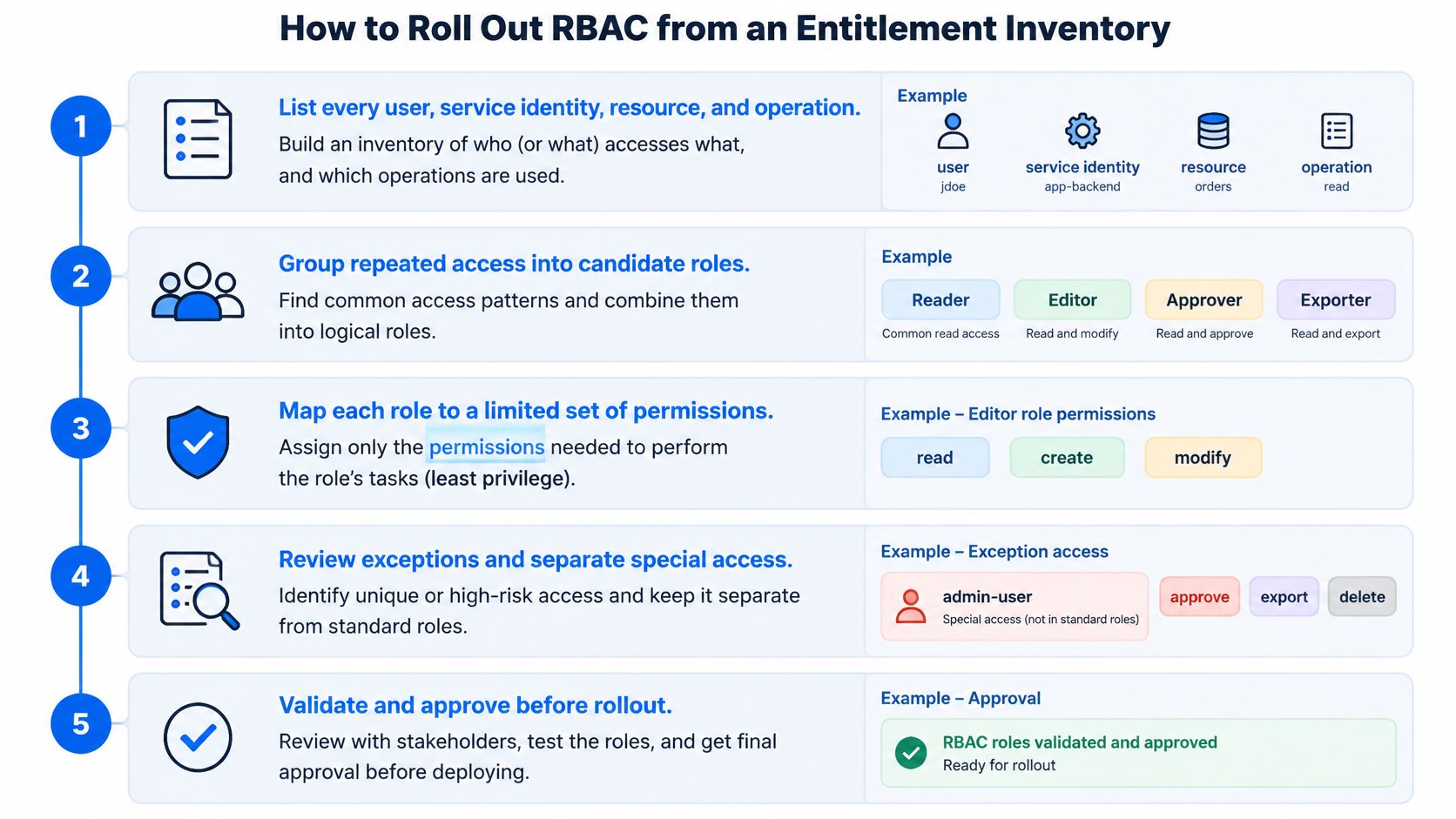
Don't start by naming roles. Start by finding out what access already exists, including the grants nobody remembers making. The sequence below moves from inventory to governed roles you can test.
Use this visual sequence as you work through your own inventory.
The rollout sequence
- List every identity and operation. Enumerate users, service identities, resources, and operations before naming any role. Cover formulation records, electronic lab notebooks, model runs, instrument files, and the verbs read, create, modify, approve, export, and delete.
- Map each population to its minimum. Give each group only the operations its workflow requires. A lead who reviews a technician's batch record gets review rights, not admin or export rights because she's senior.
- Encode separation of duty. Prevent one identity from submitting and approving the same formulation release. Apply the same logic to confidential IP, so one identity can't be the sole exporter.
- Test both directions. Run positive cases that must succeed and negative cases that must fail. Test a scientist opening another team's project and a leaver who still holds export rights, not just the happy path.
- Write each role as a governed object. Record its name, business purpose, owner, permitted verbs, prohibited combinations, approval path, review interval, expiry rule, and where audit evidence lives.
- Provision from the role. Have administrators create accounts, connect the identity provider or lab systems through single sign-on, and grant access through role assignment instead of individual exceptions.
- Retire the side spreadsheet. Delete parallel grant lists so the role catalog becomes the only source of access truth.
The NIST RBAC presentation supports building roles around least privilege, with overlapping jobs not automatically inheriting the maximum privilege of every category. That's why step 2 matters. Copying a busy person's current access into a new role preserves years of accumulation.
In our implementation, accounts for a team are created and managed by the account owner or administrators of the user's organization. Users can connect Polymerize with third-party tools such as SSO providers or lab systems, and Polymerize Connect offers granular permission layers, real-time activity tracking and automated role-based workflows. Those mechanics help, but they don't decide who should approve a release. Your role owners do.
Watch the rollout walkthrough below after drafting your first inventory, then pause at each decision point and compare it with your test cases.
This sequence exists to catch two defects. Permission accumulation lets one person collect conflicting rights over time as projects change. Orphaned external identities outlive their project and keep quiet access nobody reviews. If your tests don't look for both, your rollout isn't finished.
Operating Checks That Keep Roles Honest
A catalog launched in January can misdescribe your lab by June. People change projects, plants join a program, and temporary help becomes permanent by neglect. Operations keep the catalog close to reality.
Keep one role catalog mapped to documented business functions. Keep laboratory, production, quality, intellectual-property, and administrative access separate so the same rule applies in every region. A quality reviewer in one site shouldn't gain production approval because another site uses the title differently.
Four recurring checks
- Retire dead roles: Remove roles whose business purpose has ended, instead of leaving them available for a future shortcut.
- Flag excess membership: Identify people whose permissions exceed their current job, especially after transfers and reorganizations.
- Recertify on change: Reconfirm access when someone changes project, site, or employer, rather than waiting for the annual review.
- Expire exceptions: Give temporary or emergency access a named owner and an end date, and remove it on that date.
Individual accountability supports every check. Users must not share their login or User ID with any other person. They must notify us immediately of any unauthorised access to their login or User ID. A shared lab login makes your audit trail say a role acted, when you need to know which person acted.
The NIST RBAC library reports that, by 2010, the majority of users in enterprises with 500 or more employees were using RBAC, based on analysis from RTI International. Scale is the reason informal groups fail. A handful of broad groups won't stay accurate when headcount, applications, and personnel changes keep moving.
Measure the health of the system
Track percentage of permissions attached to approved roles, dormant entitlements removed, access-review completion rate, and mean time to revoke a leaver. Add denied-request false positives, policy-test coverage, and the share of grants that are exceptions rather than catalog roles. That last measure deserves attention every quarter.
A rising exception share means your policy no longer matches the work, so fix the policy instead of approving another one-off group.
Run a quarterly rhythm. Administrators prepare the delta since the last review, role owners attest to membership and permissions, and unresolved items expire rather than roll forward. Expiry creates brief inconvenience. Silent rollover creates standing risk.
How RBAC Supports ISO 27001 SOC 2 and Privacy Law
Auditors don't ask whether you believe in least privilege. They ask for evidence that a named owner approved access, reviewed it, and removed it when the job changed. Your catalog becomes useful for assurance when each practice points to an artifact someone can inspect.
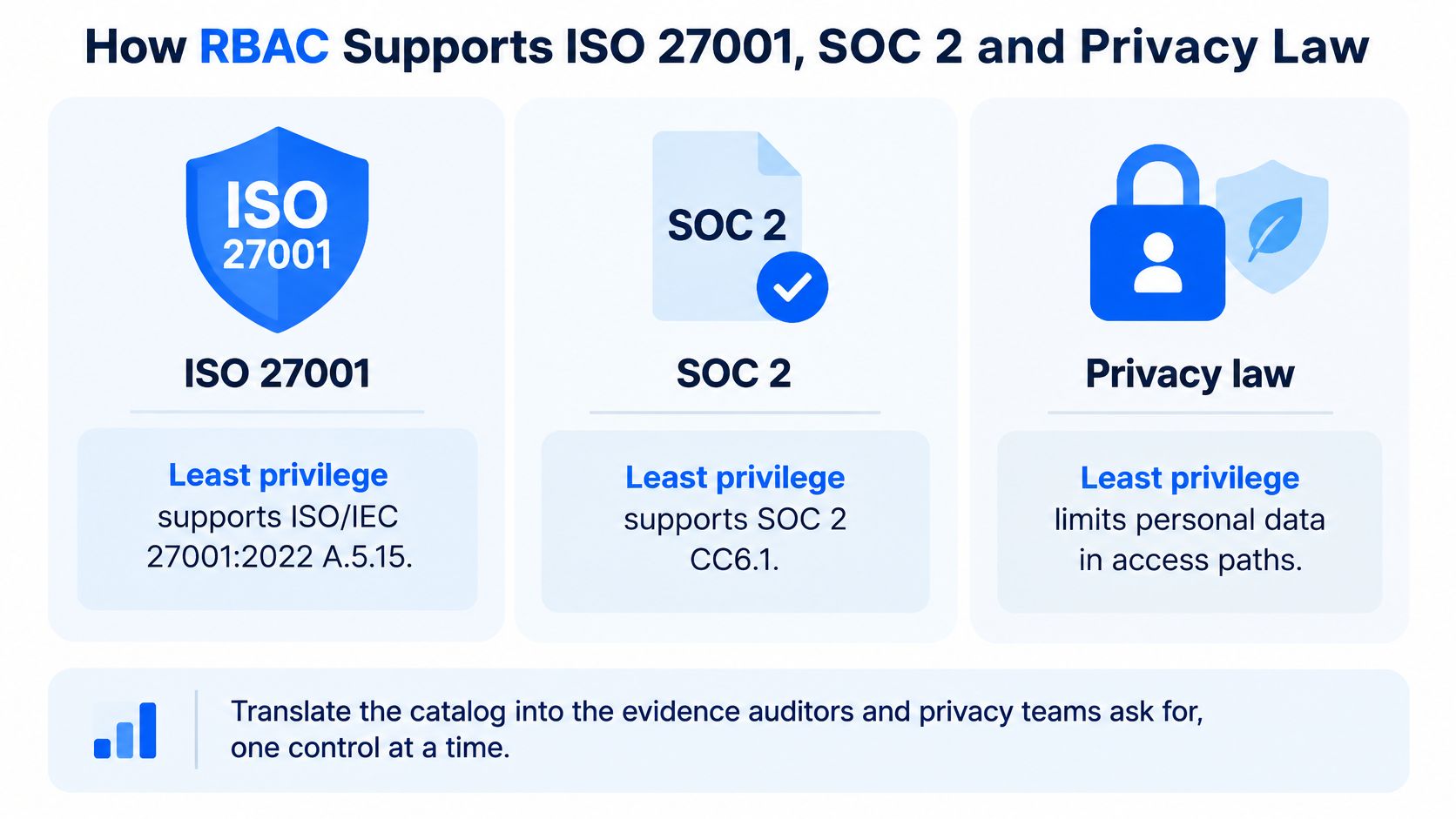
The comparison below translates the main controls into the questions audit and privacy teams usually ask.
Map each practice to its evidence
Least privilege supports ISO/IEC 27001:2022 A.5.15 and SOC 2 CC6.1. It also limits personal data in electronic lab notebooks to what each job needs, such as a technician's name on a batch record rather than wider personnel details. Readers who need a clause by clause view can use ISO 27001 clauses and audit evidence alongside their own control register.
Joiner, mover, and leaver handling supports A.5.18 and CC6.2. It's also the operating mechanism behind privacy duties, because a team can't reliably act on access, correction, deletion, restriction, objection, and portability requests if it doesn't know where an identity can still reach personal data. The access change and the privacy request need the same identity discipline.
Privileged and export paths support A.8.2 and CC6.3. Classify formulation and experimental IP before anyone can export it, and require extra approval before personal data leaves the system. Segregation of duties supports A.5.3, so the person who changes a record isn't the person who approves its release or a personal-data export.
RBAC practices mapped to common assurance requirements
| Practice | Privacy duty |
|---|---|
| Least privilege on job roles | Minimize personal data visible in lab records |
| Joiner, mover, and leaver | Honor access, correction, deletion, and portability requests |
| Privileged and export paths | Extra approval before a transfer of personal data |
| Segregation of duties | A different person approves personal-data export |
| Logging and recertification | Identity check before answering a privacy-rights request |
Logging and periodic recertification provide the monitoring trail SOC 2 examiners and customer security reviewers request. For each role, keep an evidence pack with its owner, last review date, segregation-of-duties test results, and revocation log. If that pack takes weeks to assemble, the control may exist but it isn't audit ready.
Our security includes end-to-end encryption, role-based access, and isolated data environments. We follow industry security standards, regularly conduct security audits and application testing, and provide the reports to customers. We're also GDPR and CCPA ready for global teams. Those platform controls support your evidence, but your owners still need to attest that the right people hold each role.
When More Roles Make Access Worse
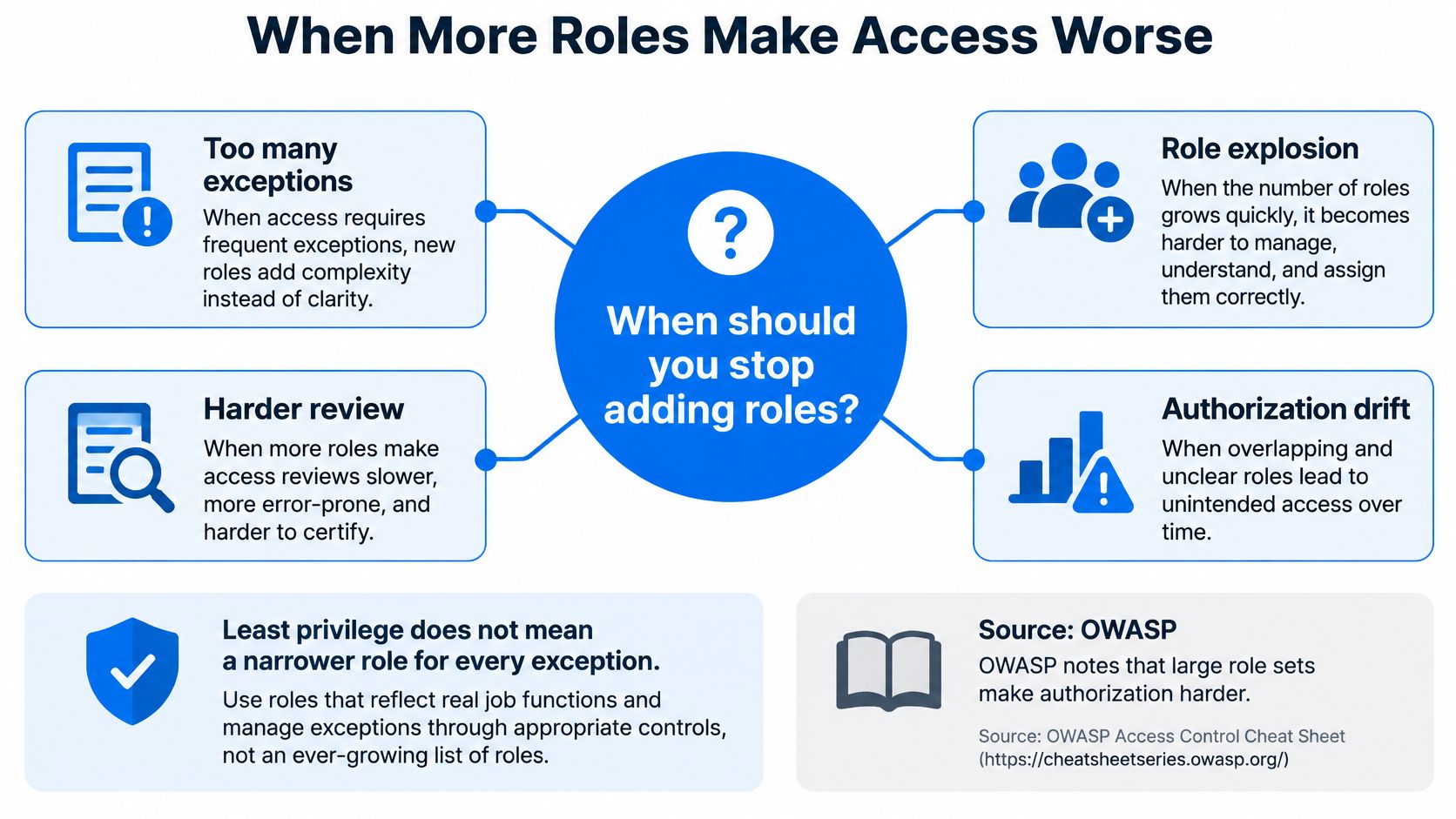
Least privilege doesn't mean a narrower role for every exception. Teams often create roles such as Scientist India, Scientist India Project Kite, and Scientist India Project Kite Export Temporary, then discover nobody can explain the difference during a review. The catalog grows, while confidence falls.
The OWASP Authorization Cheat Sheet notes that large role sets make authorization checks, testing, and auditing harder, and that RBAC fits shared multi-organization resources poorly because each tenant may need cumbersome rule sets or pre-provisioned identities. Static roles also over-grant when the decision depends on project, relationship, data sensitivity, or time.
This diagram shows how exception handling turns into drift when every special case becomes a new title.
Stop adding roles at four signals
- Growth outruns headcount: Role count rises faster than the population using the system.
- Exceptions become routine: Administrators expect to supplement the assigned role for normal work.
- External access repeats: Plants or testing partners need the same record without holding an employee role.
- Reviews keep rejecting members: Owners repeatedly remove people from one role because its scope no longer matches their work.
For each signal, add a condition or time bound instead of a new role title. Keep the six catalog roles stable and evaluate context at request time. Project membership sets the baseline, data classification decides whether view or export is allowed, and a risky context such as an unfamiliar device or out-of-window request triggers step-up authentication or denial.
Design test: If a reviewer needs a walkthrough to understand what a role allows, the role is too opaque to approve confidently.
Validate the design with simulated requests. Try a peer opening another project, an expired contractor reopening a record, and a changed object identifier pointing to a confidential formulation. Test hierarchy and object checks against the production data store too, because a correct policy can still fail where the application enforces it.
Access for Agents Instruments and Service Accounts
A scheduler kicks off a model run at 2 a.m. An instrument connector uploads raw spectra. An experiment-planning agent drafts five candidate formulations. None of these actors holds an employee badge, yet all of them can reach formulation IP while working for a scientist, a lab, or a scheduled workflow. Treating them as shared users hides who requested the work and what software performed it.
The gate pattern below separates the human principal, the agent, and the protected lab system.
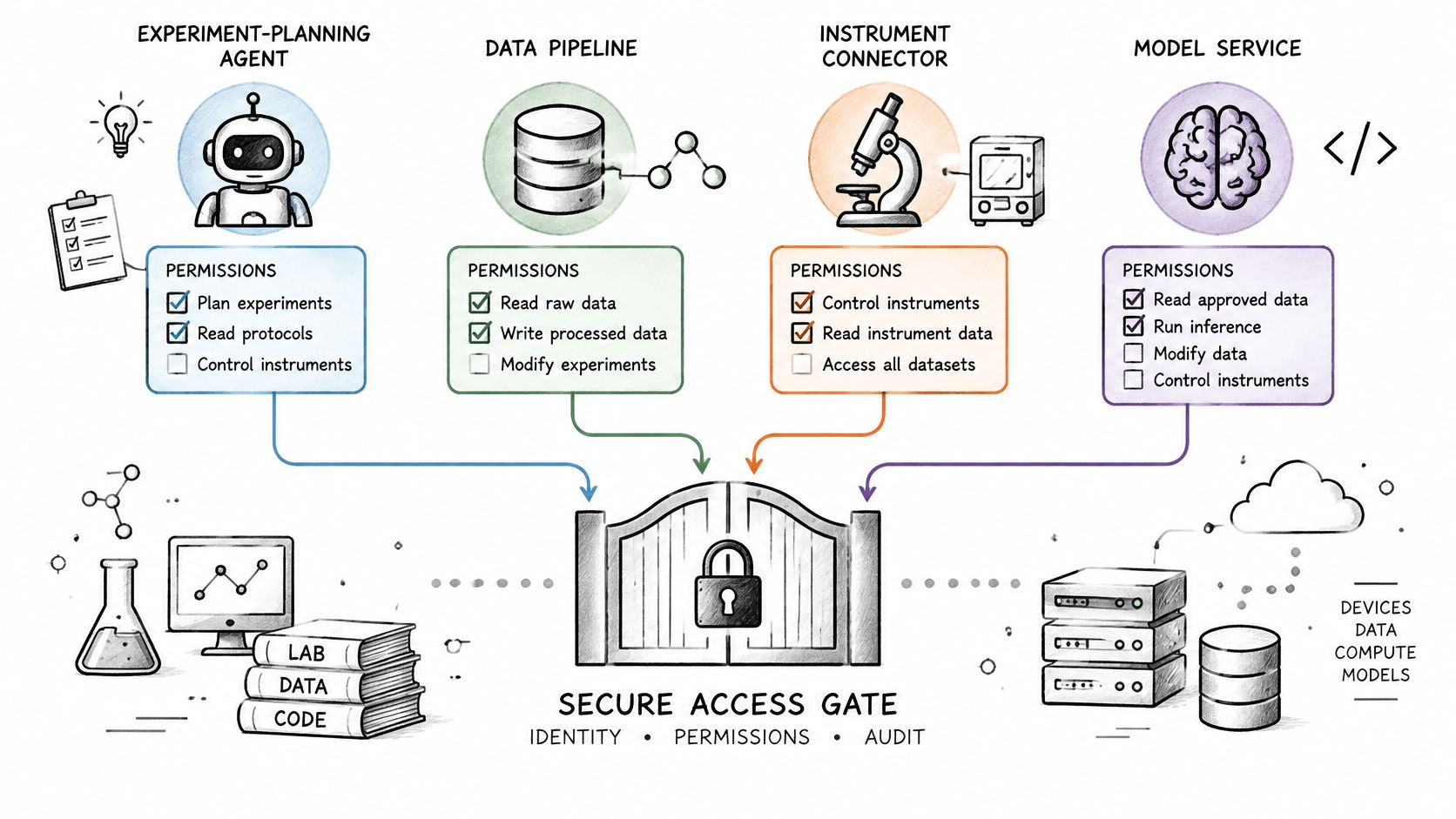
A machine credential works like a contractor badge: it names the visitor, the sponsor, and the doors it opens. So don't give an agent the scientist's role, and don't embed a bearer secret in a workflow where anyone who reads the automation can copy it. The analysis of non-human identity security describes an AI agent as a privileged machine identity that may also carry delegated human authority, with credentials linked to both the agent software and the human or organization it acts for.
A planning agent example
Say a scientist asks an agent to propose the next five formulations and run property models on approved project data. Authorize the request by combining agent identity, originating principal, requested action, resource sensitivity, purpose, and transaction context. The agent may read the project and create proposed experiments for a limited session, but a person must approve exporting a confidential formulation or changing a released recipe. The agent proposes. The scientist disposes.
Instrument service accounts need narrower limits. A balance or microscope integration may create raw results and attach files, but it must not approve quality release or export IP. Vault and rotate its credential, tie it to the integration owner, and disable it when the integration or principal leaves.
Write an audit record that names both the agent and the delegating person. Then test three cases before launch: an agent without a principal is denied, an expired delegation is denied, and a successful model run records who asked and which agent ran. If the log can't answer those questions, the automation isn't ready for confidential work.
Assign Owners Before the Next Experiment Cycle
You don't need a six month identity program to remove the worst grants. You need two weeks, named owners, and tests run against the live system.
Week one
- Name owners. Assign a business owner to each of the six roles and record who can approve membership.
- Close the obvious conflicts. Find the one export path and the one release path that already break separation of duty, then fix those paths first.
- Clean dormant access. Pull the entitlement inventory for formulation records, model runs, and external partners. Revoke anything dormant or tied to a shared login.
- Book the first review. Schedule the quarterly review before the next scale up gate so quality and IP owners attest while the project is still active.
Week two
- Connect the identity provider. Stop maintaining joiners and leavers by hand where SSO can drive account creation and removal.
- Run live tests. Repeat positive and negative cases against production permissions, including cross project access and expired partner access.
- Publish one catalog. Place the catalog where every lab tool can read from it, rather than inventing a second access model inside each tool.
Make one decision before the next cycle starts. Don't let a broad scientist group remain able to edit, approve, and export the same record. Replacing that single grant will do more for IP protection than adding ten narrowly named roles nobody owns.
Polymerize helps materials teams centralize experimental data and apply role-based permissions around who can view, edit, approve, or export formulation work, backed by activity tracking for review. If you're rebuilding laboratory access before your next program gate, visit Polymerize to see how those controls fit your R&D workflows.
Put your R&D data to work
See how materials teams use Polymerize to plan fewer experiments and reach target properties faster.