


You've finished a materials experiment and now have cure temperature in °C, tensile strength in MPa, and viscosity in Pa·s. All three measurements belong to the same run, so putting them on separate pages feels wasteful. Yet a single y-axis can't display them accurately because the units and magnitudes differ.
That's where multiple axis graphs become tempting. A dual-axis chart can place temperature and tensile strength on one canvas, while a more complex multi-axis graph can add viscosity or conversion. The result may reveal timing, shape, and possible relationships that are difficult to spot in separate plots.
It can also create a confident-looking mistake. A line crossing another line doesn't necessarily mean one material property overtook another, and two lines that move together don't prove that one process parameter caused the other to change.
This guide takes a practical route. You'll learn how these graphs work, when they help, why scale choices can distort interpretation, how to build them in Excel, Python, R, and Tableau, and when normalization or small multiples are safer. The examples focus on materials R&D, where scientists regularly compare properties with different units against shared process parameters.
Table of Contents
- Introduction
- What Multiple Axis Graphs Are and How They Work
- When Multiple Axis Graphs Make Sense
- A crossing line is not an intersection of values
- Proximity can imply causality
- Baselines can manufacture a visual relationship
- Dashboards add binding and overload risks
Introduction
At a formulation review, two curves rise together and cross near the end of a curing run. One scientist sees a possible process relationship. Another asks whether the apparent pattern comes from the chosen scales. Both reactions are reasonable, because a multi-axis chart can reveal timing while also making unrelated measurements look comparable.
A standard line chart gives every series one y-axis. Temperature and tensile strength may then use incompatible units, leaving one line compressed near the baseline. Adding viscosity and conversion makes the pattern harder to read. Rescaling can bring the lines into view, but it removes the immediate meaning of their original units and absolute values.
A dual-axis graph gives two series a shared x-axis, such as time, dose, temperature, or residence time, while assigning each series its own y-axis. One scale commonly appears on the left and the other on the right. A multi-axis graph extends the arrangement to three or more y-axes, increasing the need for careful labeling and restraint.
The format has legitimate uses in professional financial communication and scientific software. OriginLab graphing documentation describes multi-axis plotting as a supported graphing capability. That support does not make every chart persuasive. A line crossing another line does not mean one quantity overtook the other, and aligned movement does not establish causation.
A useful decision framework asks what comparison the chart must support, whether the series share a meaningful x-axis, and whether their scales can be read without confusion. This article applies that framework to safe design, failure cases, and code examples in Excel, Python, R, and Tableau. It also keeps materials R&D in view, where researchers routinely compare several properties with different units against process parameters. Start with the analytical question, then choose a chart that preserves the evidence readers need.
What Multiple Axis Graphs Are and How They Work
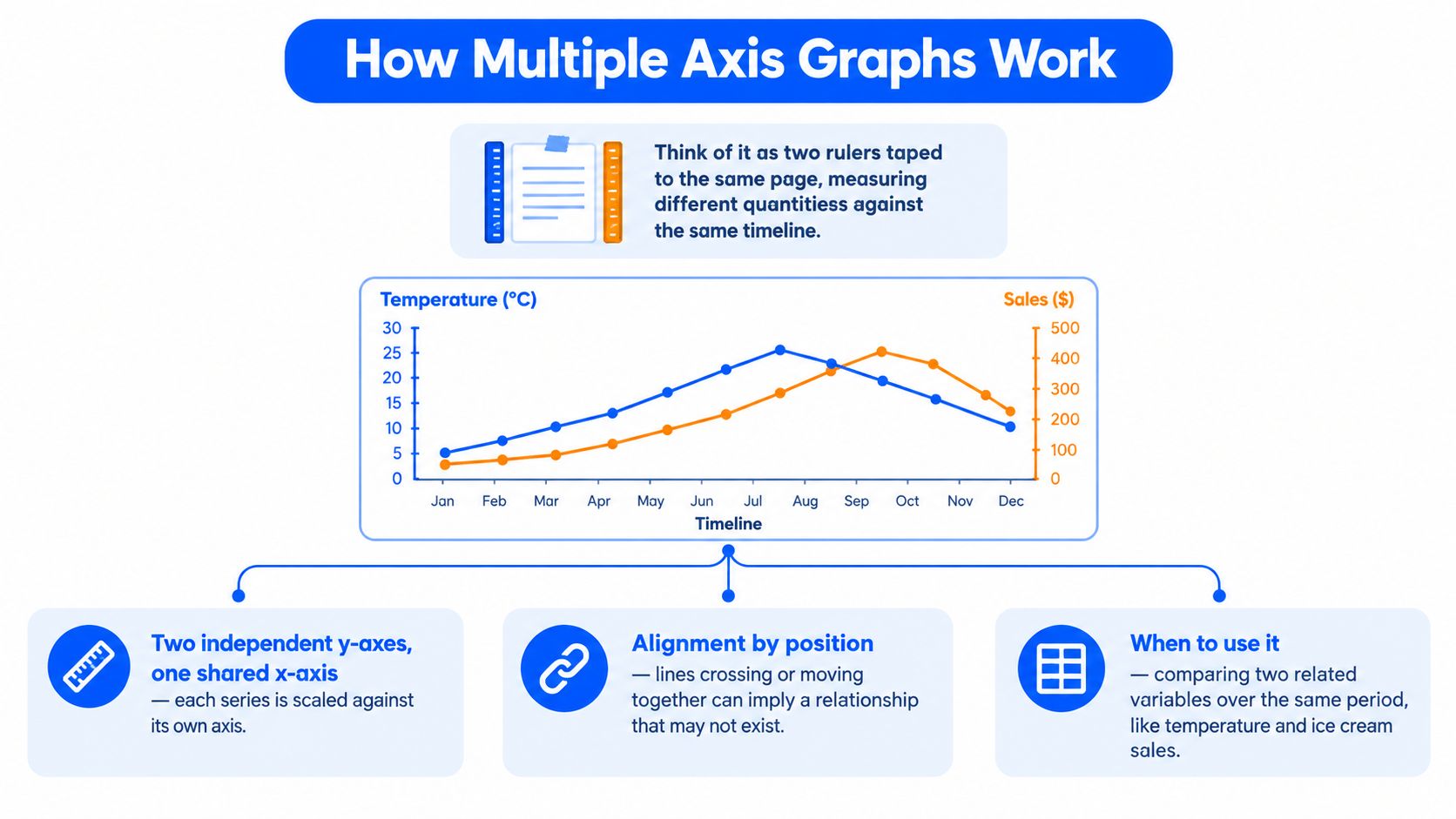
Think of a dual-axis graph as two rulers taped to the same sheet of paper. Both rulers measure distance along the same horizontal path, but each ruler uses its own unit system. One might measure temperature, while the other measures tensile strength. The shared horizontal dimension could be cure time or reactor residence time.
A multiple axis graph uses one shared x-axis and two or more independent y-axes so differently scaled measurements can appear in one visual frame.
Start with the x-axis. It establishes the common position for every observation. If the x-axis shows cure time, a point at the same horizontal location represents the same moment in the experiment for every series. If it shows formulation concentration, each series is evaluated at the same concentration.
Next, identify the y-axes. In a conventional dual-axis graph, the left y-axis belongs to one series and the right y-axis belongs to another. The left scale might run in degrees Celsius, while the right scale uses MPa. The values aren't interchangeable. Their shared position tells you when changes occurred, not whether one numerical height is greater than the other.
Color is the visual mapping between a series and its axis. A blue temperature line should use a blue axis title or tick labels, while an orange tensile-strength line should match the orange right axis. Without that mapping, readers must repeatedly trace the line across the plotting area and guess which scale applies.
A multi-axis graph adds another independent scale. Three y-axes might represent temperature, viscosity, and conversion against one shared reaction timeline. Four-axis plots are also supported by mainstream scientific tools. The OriginLab tutorial for 4-Y plots demonstrates a workflow for adding four y-axes, additional layers, and reusable templates.
That capability doesn't mean more axes produce better analysis. Each extra scale adds another mapping for the reader to remember. Before interpreting a line, identify its color, follow it to the legend or axis title, and read its value only from the matching scale.
When Multiple Axis Graphs Make Sense
A materials scientist reviews a cure cycle with temperature, viscosity, and conversion on the same timeline. Temperature levels off, viscosity climbs, and conversion accelerates. The immediate question is about sequence: which event happens first, and which follows? A multi-axis chart can answer that question when it keeps the comparison focused.
Use one when the variables have genuinely different units or magnitudes. Temperature in °C and tensile strength in MPa cannot share a meaningful numerical scale without transforming one series. Keeping both scales visible may help a process engineer compare cure temperature with hardness while preserving the meaning of each measurement.
The question should concern timing, direction, or shape, rather than direct height comparison. You might ask whether viscosity rises during the same stage that temperature reaches a plateau, or whether conversion begins accelerating before or after a temperature change. The chart aligns events on the x-axis. It does not make the units comparable.
Keep the series count small. Two series are usually easier to follow than three, and every added axis creates another mapping for the reader to remember. Temperature, viscosity, conversion, tensile strength, modulus, and pressure might describe a full experiment, but placing them together can hide the finding you want readers to see.
A dual-axis design is most defensible when both series are measured repeatedly along the same x-axis and the audience needs to inspect their order over time. Financial reporting is a familiar example, where price and volume may appear in one time-based view. A professional financial charting reference from OriginLab illustrates this established chart format, but familiarity alone does not make every pairing appropriate.
A shared date or category is not enough. Two business metrics may rise in the same quarter because of seasonality, a third factor, or random variation. The common canvas shows coincidence, not a mechanism.
Rule of thumb: use multiple axes to align a small number of related measurements, then state the comparison the chart is meant to support.
If readers must compare exact values, judge slopes across independent scales, or decode many axes at once, choose a different design, such as separate aligned panels or normalized series. That gives the analysis a clearer path without forcing unlike measurements into one visual frame.
Common Pitfalls That Mislead Readers
A materials scientist reviews a cure experiment and sees temperature and viscosity rising together. The lines appear to meet near the reaction endpoint, so the chart seems to show a meaningful relationship. Change the y-axis limits, tick intervals, or baselines, and that apparent relationship can shift or disappear while every recorded observation remains unchanged.
Scale controls the picture. With one pair of axis ranges, two lines may seem to move together. Expand the temperature range, compress the viscosity range, and they may look almost parallel. Adjust the baselines again, and their crossing may vanish. The chart has changed the visual story, not the experiment.
The Datawrapper guidance on dual-axis charts explains that relationships in these charts depend on scale. It recommends matching each series with its axis title and color, aligning axis growth rates where appropriate, and avoiding comparisons of height or rate of change across independent axes unless the values have been normalized.
A crossing line is not an intersection of values
With one y-axis, two crossing lines can indicate that one value became greater than the other. With two axes, a crossing usually means only that the drawn paths occupy the same screen position. Their units remain different. A viscosity line crossing a temperature line does not mean that viscosity and temperature reached the same value, or that one overtook the other.
Readers can still compare timing. They may ask whether both variables began rising during the same process stage, peaked near the same x-position, or changed direction together. Those are temporal comparisons, not comparisons of absolute magnitude.
Proximity can imply causality
Two lines that rise together invite a causal explanation. A rise in curing temperature may coincide with higher conversion, but the chart alone cannot establish that heating caused the change. Catalyst concentration, mixing quality, residence time, or another unmeasured variable could influence both.
Write annotations that match the evidence. “Conversion increased during the heating stage” describes the observation. “Heating caused conversion to increase” requires an experimental design or additional analysis that can test causality.
Baselines can manufacture a visual relationship
Independent axes may begin at different values, use different intervals, or place zero at different visual heights. Readers who compare the vertical positions of the lines may unconsciously treat both series as if they shared a baseline. They do not.
The European data visualisation guide recommends separate charts when accurate comparison is the goal. A shared plotting area can suggest a relationship that the measurements do not establish.
Dashboards add binding and overload risks
Interactive dashboards introduce implementation errors as well as visual ones. A series can be assigned to the wrong axis when a chart defaults to the first declared scale, producing a technically valid but semantically incorrect result. Dense views also force readers to track colors, legends, axes, hover states, and mixed line-and-bar encodings at once.
The ClicData guidance on dashboard misreads describes axis confusion and clutter in dense multi-metric environments. Before accepting a multi-axis graph, verify each series-to-axis binding, test several scale settings, and ask what comparison the reader must make. If the answer depends on exact values, slopes, or many simultaneous mappings, use aligned panels or normalized series instead.
Design Best Practices for Multi-Axis Charts
Good design makes the mapping between a line and its scale immediate. Don't force readers to inspect a legend, trace a color across the plot, and then search for an unlabeled tick range.
Make each mapping visible
Use a distinct color for each series, and reuse that color for the corresponding axis title and tick labels. Label every axis with the variable name and unit, such as “Cure temperature, °C” or “Tensile strength, MPa.” A legend that says only “Temperature” is weaker than one that states “Temperature, °C.”
Use a descriptive title or caption to explain the intended comparison. “Cure temperature and conversion during the reaction” tells readers what is being aligned. A note such as “Axes are independent. Line heights aren't directly comparable” prevents a common misreading.
Control the scales deliberately
Where possible, align the growth rates of the axes so equal visual distances represent comparable relative changes. If one axis uses a compressed range and the other uses a broad range, explain why. For charts with bars or filled areas, zero baselines deserve particular care because readers interpret the size of those shapes as magnitude.
Avoid comparing line height or slope across independent axes. You can compare whether two series rise, fall, peak, or change around the same x-position. You can't safely conclude that the steeper-looking line changed faster in its original unit.
If a reader could draw a wrong conclusion from your axis ranges, redesign the chart or state the limitation directly in the figure.
Keep the chart restrained
Use no more series than the analytical question requires. Mixed line-and-bar combinations can distinguish series, but they also add an encoding choice. Use them only when the difference improves comprehension rather than decoration.
In software, explicitly bind every series to a named axis. Many multi-axis implementations assign an unbound series to the first declared axis by default. That silent behavior can mislead a dashboard user even when the chart renders correctly.
Before publishing, run this checklist:
- Units: Does every y-axis identify its unit?
- Color: Does each series match its axis and legend entry?
- Question: Does the chart answer one clear comparison question?
- Scale: Have you checked how the visual changes under reasonable axis ranges?
- Crossing lines: Have you avoided treating a visual intersection as a value intersection?
- Series count: Would two aligned panels communicate the result more clearly?
- Caption: Does the note explain that the axes are independent?
How to Create Multiple Axis Graphs in Excel, Python, R, and Tableau
The tools differ in interface, but the logic remains consistent. Define the shared x-axis, assign each series to the correct y-axis, label the units, and inspect the result for misleading visual alignment.
Excel
Create a line or combination chart from your selected data. Open Chart Design, choose Change Chart Type, select Combo, and enable Secondary Axis for the series that needs the right-hand scale. In some Excel versions, you can also right-click the series, choose Format Data Series, and select Secondary Axis.
A conceptual worksheet setup might look like this:
Time | Temperature (°C) | Tensile strength (MPa)
Then assign Temperature to the primary axis and Tensile strength to the secondary axis. Excel's convenience is also its weakness: it can create a plausible chart before you've labeled the axes or checked whether the ranges create a false visual relationship.
Python with Matplotlib
Matplotlib uses a second axes object that shares the x-axis. Color the right-side spine and tick labels to match the second series.
fig, ax1 = plt.subplots()ax1.plot(time, temperature, color="tab:blue")ax1.set_xlabel("Cure time (min)")ax1.set_ylabel("Temperature (°C)", color="tab:blue")ax2 = ax1.twinx()ax2.plot(time, strength, color="tab:orange")ax2.set_ylabel("Tensile strength (MPa)", color="tab:orange")
The twinx() method is flexible, but it won't decide whether the chart is analytically appropriate. Set limits intentionally and consider a shared annotation that explains the independent scales.
R with ggplot2
ggplot2 deliberately avoids unrestricted dual-axis plotting because independent scales can encourage misleading comparisons. Its accepted workaround transforms one series into the coordinate system of the other, then uses sec.axis to display the original labels.
scale_factor <- max(temp) / max(strength)ggplot(df, aes(time)) + geom_line(aes(y = temp, colour = "Temperature")) + geom_line(aes(y = strength * scale_factor, colour = "Strength")) + scale_y_continuous(name = "Temperature (°C)", sec.axis = sec_axis(~ . / scale_factor, name = "Strength (MPa)"))
Because the transformation is explicit, you must document it and ensure that the reverse transformation is correct. For clearer comparisons, use patchwork or another layout tool to place separate plots side by side.
Tableau
In Tableau, drag a second measure into the view, then place it on the right-hand axis and choose Dual Axis. Right-click an axis to Synchronize Axis when the analytical design requires aligned ranges. Leave the axes independent when they represent different units, but make the distinction obvious through titles, colors, and annotations.
Tableau makes exploratory work fast, which can encourage adding measures until the view becomes crowded. Treat every additional axis as a design decision, not as a free dashboard feature.
Safer Alternatives to Multiple Axis Graphs
A dual-axis graph is only one way to align variables. If the reader needs accurate comparison rather than exact values in their original units, choose a view that makes the comparison explicit.
Normalization puts series on a common scale, often by expressing each value relative to a reference value or maximum. The original units disappear, so the chart cannot answer, “What was the viscosity?” It can answer, “Which series changed more relative to its reference?” Label the method clearly, because an indexed value is not a measurement in the original unit.
Small multiples give each variable its own panel while keeping the x-axis aligned. Every panel can retain an appropriate y-axis, allowing readers to compare peaks, timing, and overall shape without treating unrelated units as if they shared a scale. The panels work like separate windows onto the same experiment, rather than forcing every measurement onto one canvas.
Faceting automates this small-multiple layout in R, Tableau, and Python plotting libraries. It is useful when the same chart structure must be repeated for formulations, batches, or material properties. Set sensible panel ordering and labels before generating many views, or the repetition will become difficult to scan.
| Approach | Best For | Misreading Risk | Common Tools |
|---|---|---|---|
| Dual-axis | Aligning a small number of related measures with different units | High if readers compare heights, slopes, or crossings | Excel, Matplotlib, Tableau |
| Normalization | Comparing relative movement or response shape | Readers may forget that absolute units were removed | Python, R, Tableau, Excel |
| Small multiples | Comparing trends while preserving each variable's scale | Panels can require more scanning | Excel, R, Python, Tableau |
| Faceting | Repeating aligned panels across formulations or categories | Too many panels can become difficult to read | ggplot2, Tableau, Matplotlib |
Use the ClicData dashboard guidance as a practical checklist when several panels or metrics compete for attention. The question is whether each view helps a reader compare the intended feature, not whether every available measurement fits on one screen.
Choose the alternative from the analytical question. Use normalization for relative change, small multiples when preserving units matters, and faceting for repeated groups. Keep a dual-axis chart only when a small set of related measures must be compared over the same x-axis and the separate scales are labeled plainly.
Multiple Axis Graphs in Materials R&D and Key Takeaways
Materials R&D provides a strong test for chart design because one experiment can produce many valid measurements. A formulation chemist might track cure temperature and residence time as process parameters, then measure viscosity, conversion, tensile strength, and elongation. The temptation is to place every variable on one multi-axis graph and search for a process window where the lines appear to converge.
A more disciplined workflow starts with the question. Suppose the goal is to identify when a formulation reaches sufficient conversion without making viscosity unmanageable. A dual-axis chart could show temperature and viscosity across residence time, while a separate aligned panel shows conversion. Tensile strength might belong in a later chart because it is measured after curing rather than continuously during the process.
This distinction matters. A chart can reveal that viscosity changes during the same period as a temperature ramp. It can't, by itself, prove that temperature caused the viscosity response. Scientists should combine visual timing with designed experiments, material knowledge, and models that account for other process variables.
A practical R&D plotting sequence
- Define the process axis. Choose time, temperature, dose, residence time, or another parameter that is common to the measurements.
- Choose the smallest useful set. Start with two series tied to one decision, rather than every available sensor and test result.
- Preserve the original units. Use a dual axis only when those units need to remain visible in one view.
- Validate the visual relationship. Change the axis ranges, inspect crossings, and check whether the apparent pattern survives.
- Move to aligned panels when the view gets crowded. Preserve the same x-axis and let each property keep its own scale.
A structured data backbone also improves the charting process. When experimental observations from spreadsheets, ELNs, and laboratory systems use consistent names, units, formulation identifiers, and timestamps, scientists can reproduce a figure instead of rebuilding it manually from disconnected files.
Keep these principles close:
- Use multiple axes selectively. Different units and a shared analytical question justify the format.
- Treat scale as part of the argument. Axis ranges influence what readers think they see.
- Never read across independent axes. A line crossing or matching height has no direct numerical meaning.
- Label the mapping. Match series colors to axis colors and state the units.
- Prefer aligned alternatives when comparison matters. Normalization, indexed values, small multiples, and faceting reduce ambiguity.
- Separate correlation from causation. A visual pattern is a prompt for investigation, not proof of mechanism.
The practical path forward is simple. Build the multi-axis version when it helps you inspect a tightly defined relationship, then build a safer alternative beside it. If both tell the same story, publish the version your audience can interpret most reliably.
Polymerize helps materials teams unify experimental data from spreadsheets, ELNs, and research silos, giving scientists a consistent foundation for repeatable charts and AI-guided analysis. Explore how Polymerize can help your R&D team connect process parameters with material properties and plan better experiments.
Put your R&D data to work
See how materials teams use Polymerize to plan fewer experiments and reach target properties faster.